Blackmagic Design ATEM 4 M/E Constellation IP
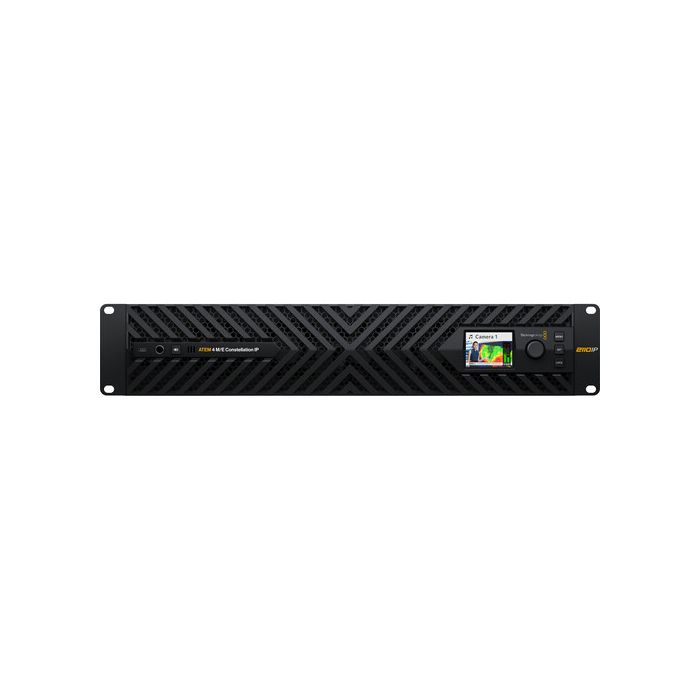
by Blackmagic DesignA new addition to the Constellation line, the ATEM 4 M/E Constellation IP Switcher from Blackmagic Design is a 2 RU live broadcast rackmount switcher that features 32 native SMPTE 2110 IP video inputs and 28 outputs (including multiview) via 100G fiber Ethernet ports.
- Ratenzahlung Sie können auf Raten mit den Visa, Visa Premium, Maestro, Master Card und Diners reditkarten zahlen. Die Gebühr beträgt 5% des offengelegenen Preises und wird im Warenkorb bei der Zahlungsauswahl gerechnet. Sie können mehr Details auf dem Link Zahlungsarten überprüfen.
- Schnelle Lieferung Für alle Lieferungen innerhalb Kroatiens, die bis 14.00 Uhr erhaltet werden, wird die Lieferung binnen einem Arbeitstag geliefert. Für die ganze Europa nehmen wir die schnelle Zustellung vor und mehr Details können Sie auf dem Link Lieferungsarten überprüfen.
- Internationaler Kauf Die EU-Firmen (außer die Republik Kroatien) zahlen den Preis ohne die Mehrwertsteuer mit dem gültigen VAT ID- Nummer. Der Preis wird bei Check-Out gerechnet. Alle Käufer außerhalb der Europäischen Union zahlen den Ausfuhrpreis ohne die Mehrwertsteuer.
Paket beinhaltet
- Blackmagic Design ATEM 4 M/E Constellation IP Switcher
A new addition to the Constellation line, the ATEM 4 M/E Constellation IP Switcher from Blackmagic Design is a 2 RU live broadcast rackmount switcher that features 32 native SMPTE 2110 IP video inputs and 28 outputs (including multiview) via 100G fiber Ethernet ports. Each 100G port comes as a redundant pair with standards converters on each port, making it ideal for live broadcast applications. The switcher is controlled using the ATEM Software Control app.
Updated Design
The ATEM 4 M/E Constellation IP has an updated design to accommodate high-end broadcasters. It features front-to-back cooling with four fans that are extremely quiet. All connections feature full redundancy with SMPTE-2022-7 on all video ports, plus there's additional redundancy on the control and PTP Ethernet ports.
A built-in LCD displays all standard ATEM Constellation status information and provides access to settings menus. The front panel even includes a headphone connection and a built-in speaker for local program monitoring. A USB-C connection on the front panel lets you update software or connect the ATEM Software Control app.
I/O Configuration
This standard 4 M/E model has 32 standards-converted SMPTE-2022-7 inputs using four sets of dual, redundant 100G Ethernet connections.
There are also 24 SMPTE-2110 outputs, 16 ATEM Advanced Keys, four multiviews, and two SuperSource for a total of 12 DVEs.
Redundant 100G SMPTE 2110 Connections
ATEM 4 M/E Constellation IP features multiple SMPTE-2110 connections using 100G Ethernet, supporting eight input and eight output video channels on each connection. The switcher then maps inputs and outputs across its multiple 100G Ethernet connections. Each 100G Ethernet connection has two separate connectors, supporting SMPTE-2110 redundancy, so you can connect each port to a separate network switch.
SMPTE 2022-7 Seamless Protection Switching sends two identical video and audio copies across connections, then on the receive side, it compares incoming RTP packets by sequence number and reconstructs a perfect video frame from the first arriving packet of pixels.
Broadcast-Style Mix Effects Switching
ATEM Constellation uses a professional "program/preview" style live production switcher operation. Both the free ATEM Software Control and the optional hardware ATEM Advanced Panels will allow program/preview style switching.
Full Standards Conversion on All Inputs
During live productions, you need to handle video sources that are not operating in the same video standard as your ATEM switcher is set to. ATEM 4 M/E Constellation IP solves this problem because each input video channel has a dedicated standards converter, so all video sources will be standards-converted to the switcher standard automatically.
USB Webcam Output
The USB-C connection on the ATEM Constellation IP rear panel can operate as a webcam source for live streaming using a laptop and streaming software. Choose any software you like, such as Zoom or Microsoft Teams, for presentations with a professional multicamera, broadcast-quality style.
Hardware or Software Control Panels
Included with ATEM Constellation is a free software-based control panel for macOS and Windows. The software connects to the switcher via Ethernet or USB, and you can control the switcher, upload media, mix audio, and control cameras. If you need more power, you can add an ATEM Advanced Panel for professional switching or an ATEM Camera Control Panel for controlling cameras. There's also an ATEM developer SDK so you can build your own custom automation control solution.
Multiview
Monitor all your sources on a single monitor with the built-in multiviews, which can be routed to any of the SMPTE-2110 100G Ethernet connectors. All multiviews are customizable and can be independently set to 4, 7, 10, 13, or 16 simultaneous views for a total of 64 views across four monitors.
You can also add a tally border, source label, and VU meters as overlays on each view. A red and green border will display the tally for each view, indicating which sources are on air.
Transitions, DVEs, and More
ATEM Constellation includes a wide range of broadcast-quality native transitions such as mix, dip, wipe, and more. All transitions can be customized in the system control menus with adjustments for border color, border width, position, direction, and more.
It also features up to four independent DVEs that let you reposition graphics and create picture-in-picture compositions, supporting position, resize, and scale, all in real time. The DVE lets you create professional picture-in-picture effects with customizable 3D borders, shadows, and lighting, or create amazing DVE transitions with squeeze and swoosh effects. Plus, you also get two independent SuperSource processors for even more DVEs and a total of 12 DVEs.
Graphics and Keying
- The built-in media pool stores broadcast-quality RGBA graphics and animations that can be played back instantly by the four media players
- The built-in graphics can be used with the media players, and you get a total of 60 stills and up to 400 frames of animation
- There are four ATEM Advanced Keyers per M/E row, with a total of 16 ATEM Advanced Keyers
Virtual Sets
With four upstream chroma keyers per M/E row, you can build virtual sets. You can use external image processors for virtual sets, or you can build a fixed camera virtual set by loading pre-rendered still image backgrounds from the media players and media pool. You can also set up macros to change cameras and load the correct background into the media players.
SuperSource Processing
In addition to the DVEs in the M/E rows, the powerful SuperSource multilayer processors, with 4 extra DVE layers plus a background layer, all appear to ATEM Constellation as an additional input source.
Any switcher video input can be used for each SuperSource DVE, then it's all layered together over a media pool custom background. SuperSource is like having an extra multilayer VFX switcher built in for doing PiP displays. With two completely independent SuperSource processors, you can use them together to get 8 view compositions.
Professional Broadcast Talkback
The switcher features a simple built-in talkback that uses audio channels 15 and 16 for 2-way communication with Blackmagic Design cameras. You can route the talkback bus to channels 15 and 16 of any special ATEM output and then send that output to the cameras or commentators you want on that talkback bus.
Fairlight Live Support
Fairlight Live is a powerful 2110 software audio mixer designed for broadcast and live events that can handle thousands of channels when running on modern macOS and Windows computers. It supports routing audio to and from ATEM Constellation switchers via USB.
Unlike hardware mixers, it natively supports stereo, surround, and immersive audio, as well as third-party plug-in support, AFL/PFL Solo, talkback, and advanced input controls such as remote gain and dual inputs. You also get a cue player, snapshots, an internal matrix, and more.
| Mix Effects | |
| Available M/E Layers | 4 M/E |
| Effect Types | 20x Luma Key |
| 4x DVE | |
| 4x Transition | |
| 4x Stinger | |
| Graphics Memory | 64 Images |
| Downstream Keys | 4x DVE |
| Generators | 21x Pattern |
| Audio Mixing | 68-Channel Mixing |
| Processing | |
| Switching Type | Software |
| Processing Resolution | UHD 4K at 60 |
| Color Processing | 10-Bit 4:2:2 |
| Input | |
| Number of Video Input Sources | 32 |
| Video Inputs | 8x QSFP28 Female |
| Input Video Format | Fiber (10-Bit 4:2:2) |
| UHD 4K at 23.98/24/25/29.97/30/50/59.94/60 fps | |
| 1080p at 23.98/24/25/29.97/30/50/59.94/60 fps | |
| 1080i at 50/59.94/60 fps | |
| 720p at 50/59.94/60 fps | |
| Output | |
| Video Output Channels | 28 |
| Video Outputs | 8x QSFP28 Female |
| Output Video Format | Fiber (10-Bit 4:2:2) |
| UHD 4K at 23.98/24/25/29.97/30/50/59.94/60 fps | |
| 1080p at 23.98/24/25/29.97/30/50/59.94/60 fps | |
| 1080i at 50/59.94/60 fps | |
| 720p at 50/59.94/60 fps | |
| Multiview Output | 64-Way Multiview |
| Connectivity | |
| Other I/O | 2x RJ45 Control Input/Output |
| 2x RJ45 Reference Input/Output | |
| 1x RJ45 LAN Input/Output | |
| Video Standard Compliance | SMPTE ST-2110 |
| Hardware | |
| OS Compatibility | macOS 15 or Later / Windows 11 or Later |
| Processor | Not Specified by Manufacturer |
| Wireless | No |
| Power | |
| Power I/O | 2x IEC C14 Input |
| General | |
| Operating Conditions | 32 to 104°F / 0 to 40°C up to 90% Humidity |
| Storage Conditions | -4 to 140°F / -20 to 60°C up to 90% Humidity |
| Rack Form Factor | 2 RU |
| Dimensions | 19 x 8.66 x 3.48" / 48.3 x 22 x 8.84 cm |
- Neu
- Neu
- Neu
- Neu
- Neu
- Neu
- Neu
- Neu